What is CRUDy?
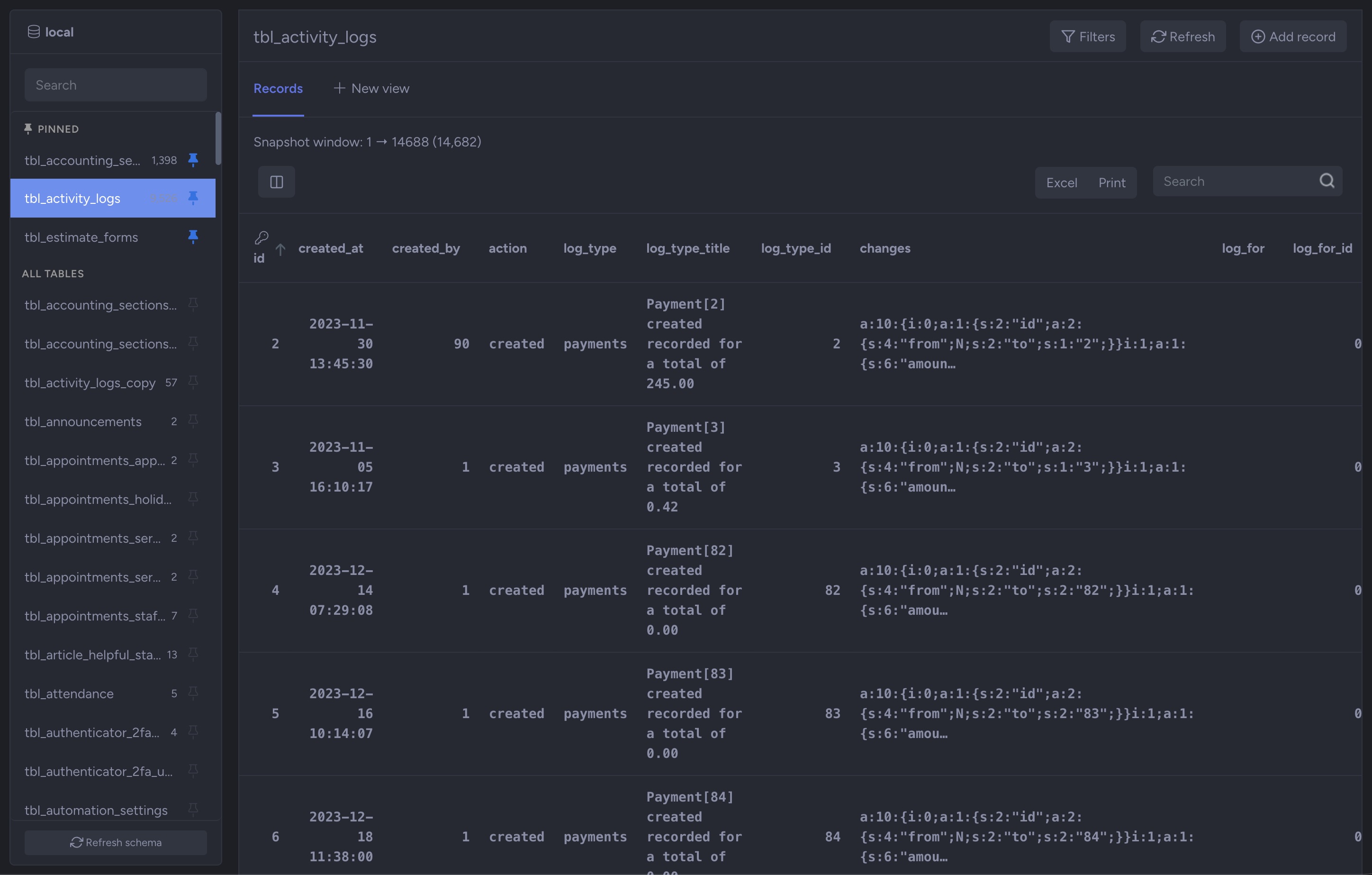
Crudy is a secure database browser and editor that runs inside your NIZU Cloud workspace. It lets your team browse tables, search and filter records, and safely create, update and delete rows in your own MySQL or MariaDB databases — directly from the workspace you already use every day, without installing a desktop client or opening your database to the internet.
Instead of connecting to your database over a public port, Crudy talks to a small agent that you install on the database server itself. The agent makes an outbound connection to your workspace and waits for work; the workspace never needs to reach into your network. This means there are no inbound firewall rules to open, no database port exposed, and no shared root credentials.
What problem does it solve?
Teams routinely need to look something up in a production database, fix a bad record, or check why a value is wrong. The usual options are awkward: hand out database passwords and a VPN, expose phpMyAdmin on a public URL, or funnel every request through one developer. Each of those is either insecure, inconvenient, or a bottleneck — and none of them leaves a trail of who changed what.
Crudy replaces all of that with a single, controlled door. Access is granted per connection to specific teams and members, every change is written to an audit log, deletes go to a recoverable trash, and the database itself stays private behind its own server. You get the convenience of a web database tool with the safety of least-privilege access and full accountability.
How it works
- The agent — a single, self-contained binary you run on your database server. It installs itself as a service, dials home over HTTPS, and executes only the queries Crudy sends it.
- Bearer-token pairing — each connection has its own secret token. The agent authenticates with it, and the token is stored hashed in your workspace. Regenerating it instantly disconnects the old agent.
- Least-privilege database user — Crudy only needs SELECT, INSERT, UPDATE and DELETE. You create a dedicated MySQL user with exactly those grants, so the agent can never drop tables or read other databases.
- Outbound long-poll, not an open port — the agent uses an outbound HTTPS connection and waits for jobs, so nothing listens on your database server for the public to reach.
Key features
- Table browser — see every table in the connected database, pin the ones you use most, and search the table list (regular expressions supported) even across thousands of tables.
- Fast record browsing — records load page by page with snapshot pagination that stays fast even on very large tables, sortable on every column and searchable across all fields.
- Safe editing — double-click a row to open it, edit fields in a clean form, and save. Create new records and delete unwanted ones, all through validated, parameterized statements.
- Trash & recovery — deleted rows are kept in a Crudy trash and can be re-injected into their table, either with their original ID or a fresh one.
- Full audit log — every insert, update, delete and restore is recorded with the user, the table, the record and the exact before/after values.
- Error log — if the database rejects an operation, the raw MySQL/MariaDB error and the statement that caused it are captured so you can see exactly what went wrong.
- Saved views — each user can build their own table views (chosen columns, optional aggregates, filters, group by, order by and an optional row limit) without writing SQL. Views are saved and re-runnable.
- Saved record filters — build multi-condition filters on a table and save them per user, server-side, so they are available on any device.
- Per-connection access control — decide which teams and members can use each connection. Admins always have access; clients are excluded.
- Admin export — administrators can export the records they are viewing to Excel or print them.
- Multi-language — the interface is fully translated across all NIZU platform languages.
- Large amount of tables — It handles easily up 2m to 5m tables without crashing your DOM or your browser.
- Large amount of fields and records without crashing your DOM or your browser
Who is it for?
Crudy is for development teams, agencies, support staff and operators who run their own MySQL or MariaDB databases and need controlled, auditable access to the data without the risk of exposing the server or handing out credentials. It suits anyone who occasionally needs to read or fix data and any administrator who needs to know exactly who touched what.
Frequently asked questions
Which databases does Crudy support?
MySQL and MariaDB. You point a connection at any database those servers host and install the agent on (or near) that server.
Do I have to open a database port to the internet?
No. The agent makes an outbound HTTPS connection to your workspace and waits for work. Nothing inbound is exposed.
Does Crudy need my root password?
No. You create a dedicated database user with only SELECT, INSERT, UPDATE and DELETE on the one database you want to browse. Crudy can do no more than those grants allow.
Can I undo a delete?
Yes. Deleted rows are stored in the Crudy trash and can be restored to their table, with either the original ID or a fresh auto-increment ID.
Is there a record of who changed what?
Yes. The audit log captures every insert, update, delete and restore with the user, the record and the old and new values.
Thursday, 18 June 2026, 9:03 PM
Created by: Konstantin Stojanovski

