

Friday, 26 June 2026, 10:59 PM
Created by: Konstantin Stojanovski
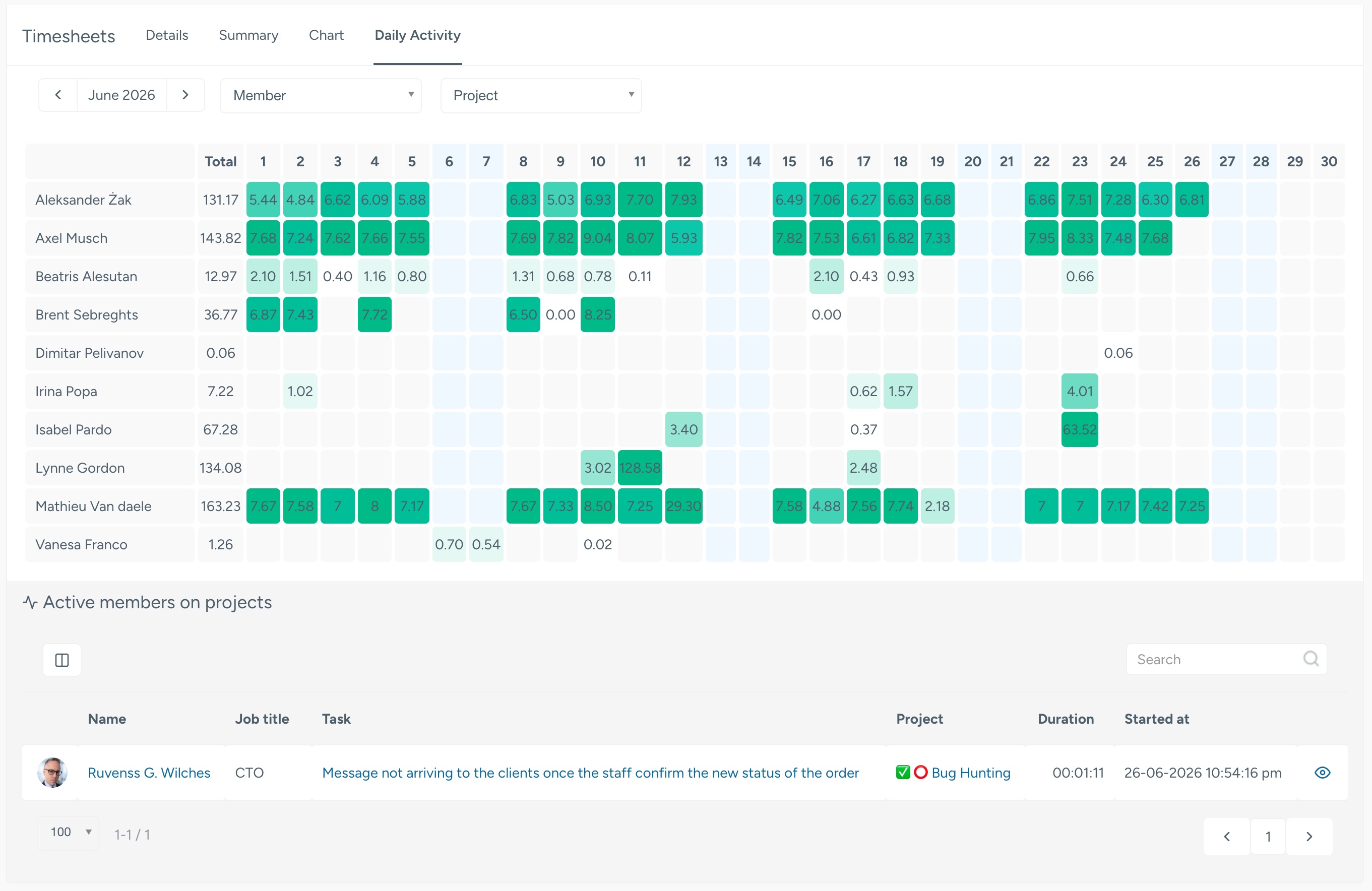
The Daily Timesheet Activity report now has two parts. The familiar activity heatmap at the top still shows how many hours each member logged on each day of the month. Below it, a new live list Active members on projects shows who has a timer running right now and exactly what they're working on.
| Column | Meaning |
|---|---|
| Avatar | The member's profile picture |
| Name | The team member click to open their profile |
| Job title | Their position |
| Task | The task they're timing click to open it |
| Project | The project the timer belongs to click to open it |
| Duration | How long the timer has been running counts up live, second by second |
| Started at | When the member started the timer |
| ? | Opens the task they're working on |
The live list follows the same timesheet permissions as the rest of the report. You'll see the members you're already allowed to view timesheets for administrators and managers with full timesheet access see everyone; others see only the members within their permitted scope.