

Saturday, 7 February 2026, 5:24 PM
Created by: Ruvenss G. Wilches
NIZU Cloud lets you fully automate the delivery of recurring invoices, ensuring your clients are billed on time without manual intervention.
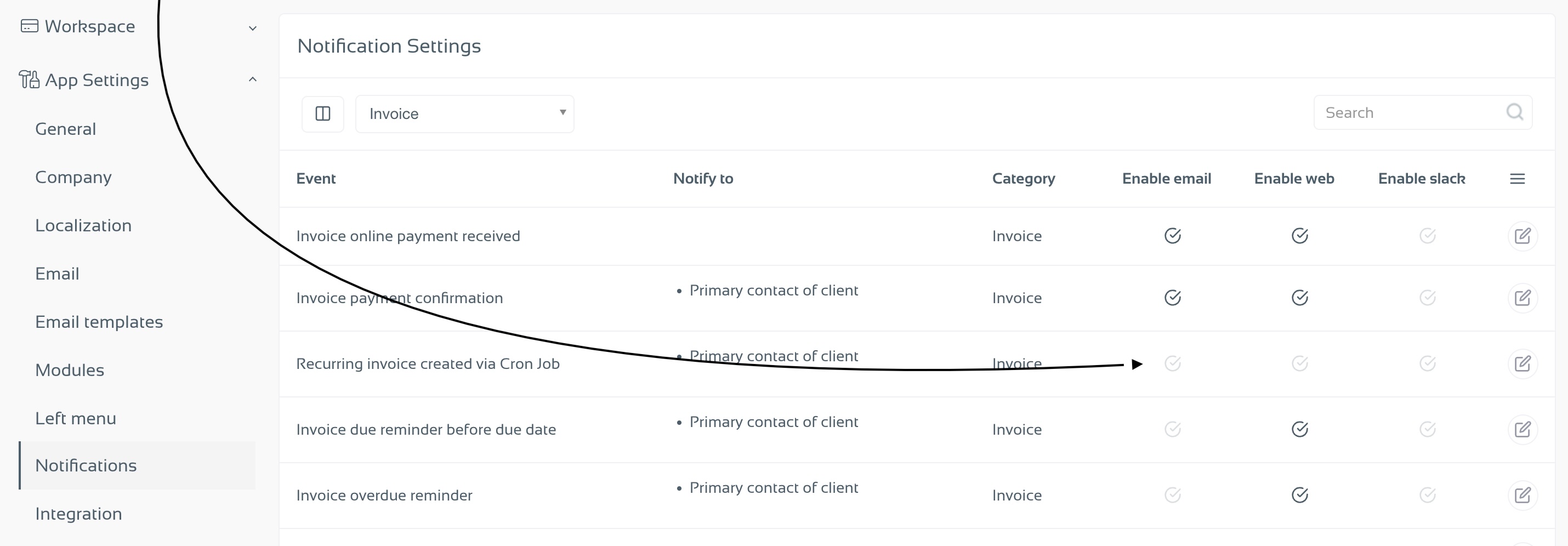
When enabled, NIZU automatically emails recurring invoices to your clients as soon as they are generated by the system.
Go to Settings
Open App Settings → Notifications
Filter notifications by the Invoice category
Locate the event “Recurring invoice created via Cron Job”
Enable the Email notification
Under Notify to, select who should receive the invoice:
Primary contact of the client
All client contacts
Once this notification is enabled, every recurring invoice generated by the cron job will be automatically sent by email to the selected contacts.
Important Note
If this notification is not enabled, recurring invoices will be created in Draft status and will not be sent automatically. In that case, you’ll need to review and send them manually.
This setup ensures consistent, reliable billing with minimal effort — letting NIZU handle the routine work for you.