

Wednesday, 11 February 2026, 10:23 AM
Created by: Ruvenss G. Wilches
When sending invoices via PEPPOL through NIZU, certain validations are performed by the PEPPOL network and the recipient’s access point.
If an invoice contains incorrect data, missing information, or fails compliance checks, PEPPOL will return a warning or rejection message.
To make this transparent and actionable, NIZU provides a dedicated tab:
E-Invoices Warnings
This tab is located in the same section where invoices are listed.
It allows users to review, understand, and fix issues quickly.
Go to Invoices
Open the tab E-Invoices Warnings
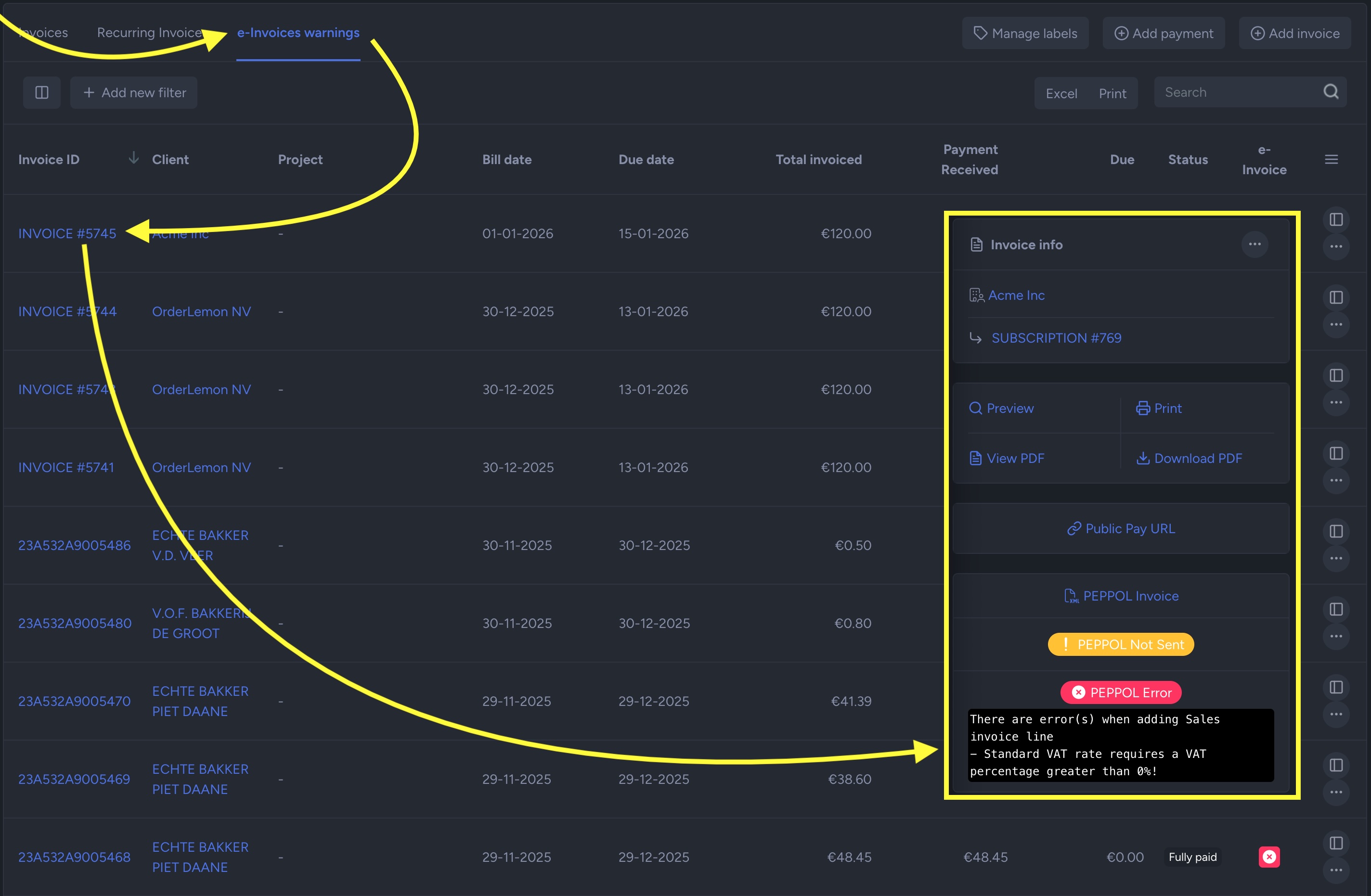
This section shows all invoices that:
Were rejected by PEPPOL
Contain validation errors
Have compliance warnings
Could not be delivered to the recipient
Invoices without issues will not appear in this tab.
For each problematic invoice, you can review:
Invoice number
Client name
Date
Status (Warning / Rejected)
Detailed PEPPOL error message
Technical validation feedback (if provided)
This allows you to identify the root cause before correcting and resending.
Below are the most frequent problems encountered when sending e-invoices.
Cause
VAT amount does not match the taxable base.
Rounding differences exceed allowed thresholds.
VAT percentage does not correspond to the applied tax category.
Example
Subtotal × VAT rate ≠ Declared VAT amount.
Resolution
Verify line-level VAT calculations.
Ensure totals match sum of invoice lines.
Confirm VAT rate matches the correct category.
PEPPOL validation is strict. Even small rounding differences may trigger rejection.
Cause
Client VAT number is incorrect or malformed.
VAT number does not match the country code.
VAT number is no longer active.
Formatting includes spaces or invalid characters.
Resolution
Verify VAT number in official registry (e.g., VIES).
Ensure proper formatting (country code + number).
Update client data and resend invoice.
Cause
The recipient company is not subscribed to the PEPPOL network.
In this case, the invoice cannot be delivered via PEPPOL.
Resolution Options
Confirm with the client if they are PEPPOL-enabled.
Request their correct PEPPOL identifier (Participant ID).
Send invoice via alternative method (PDF/email).
Wait until client activates PEPPOL.
Cause
Required PEPPOL fields are empty or invalid, such as:
Buyer reference
Endpoint ID
Payment terms
Legal entity information
Resolution
Complete missing fields in client profile.
Review invoice metadata.
Resubmit after correction.
Cause
The invoice does not comply with PEPPOL BIS format rules.
This may include:
Incorrect document structure
Unsupported values
Invalid currency codes
Resolution
These issues are typically resolved by correcting invoice data. If the problem persists, contact support with:
Invoice number
Full error message
Timestamp of submission
Inside the E-Invoices Warnings tab, invoices may show:
Warning
Invoice delivered but contains non-blocking compliance alerts.
Rejected
Invoice not delivered due to validation failure.
Only rejected invoices require correction and resubmission.
Open E-Invoices Warnings
Review error details
Correct:
Client data
VAT calculations
Missing fields
Resend invoice
Confirm status changes to Delivered
PEPPOL validation rules are country-specific and can change.
Even minor discrepancies in tax calculation may cause rejection.
NIZU validates data before submission, but final validation is performed by the PEPPOL network.
Always verify client VAT and PEPPOL registration before sending the first invoice.
Validate VAT numbers at client creation.
Avoid manual total overrides.
Keep client legal information complete.
Confirm PEPPOL participation before issuing electronic invoices.
Contact support if:
The error message is unclear.
The invoice appears correct but is repeatedly rejected.
You suspect a network or access point issue.
Provide:
Invoice number
Screenshot of error
Exact PEPPOL message
By centralizing PEPPOL warnings in one place, NIZU ensures that compliance issues are visible, actionable, and traceable — without interrupting your broader invoicing workflow.